Loaner and Returnable Devices (Check-Out and Return)
- Loaner laptops
- Tablets
- Mobile phones and hotspots
- Presentation and conference room equipment

Automate laptop and IT equipment pickup, return, and exchange with controlled self-service lockers that give employees convenient access while helping IT maintain asset visibility.
Connect with a Rep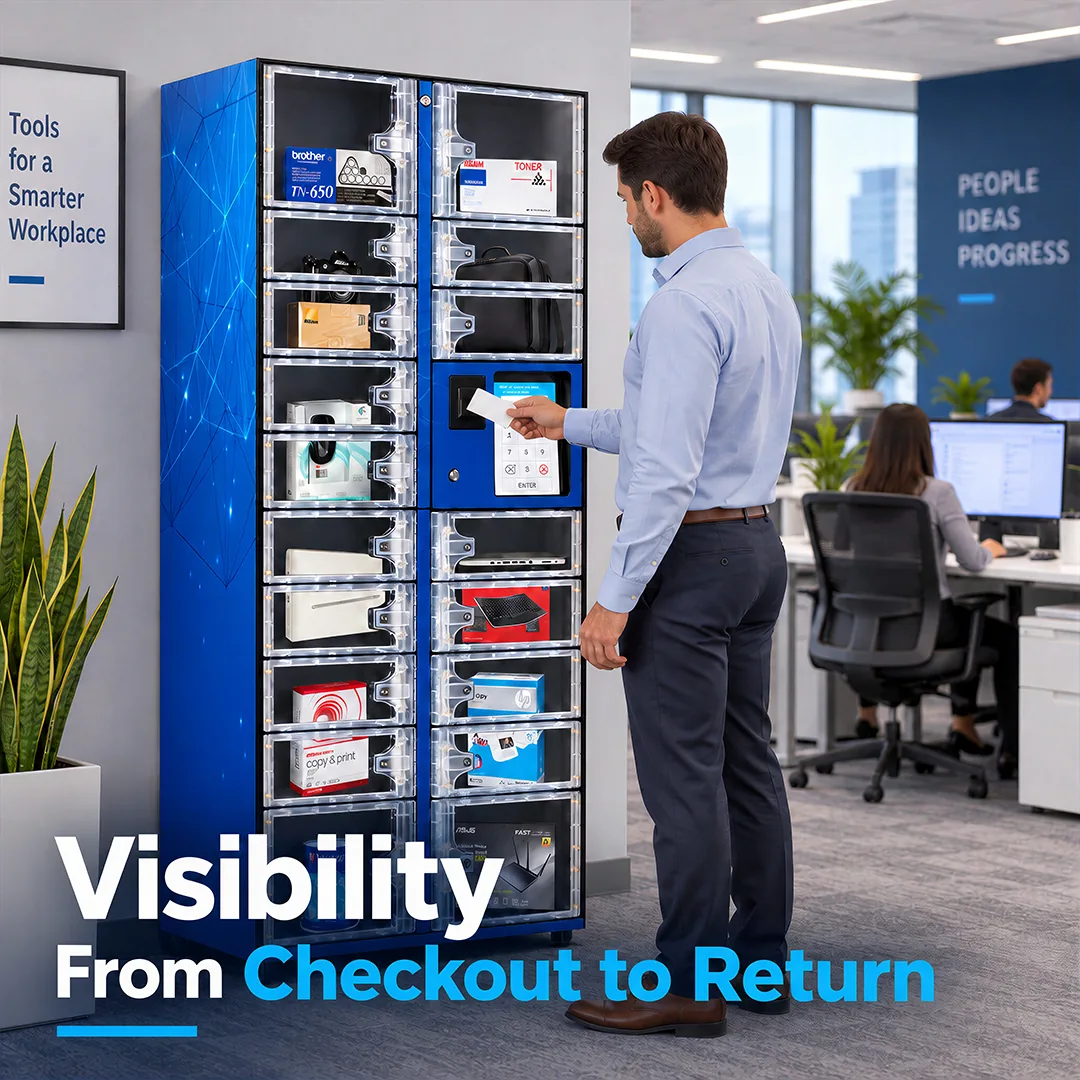
The IDS ClearVision IT Asset & Electronics Smart Locker moves routine equipment handoffs from a service desk to a secure, self-service locker. IT stages a device in a compartment, the employee gets an access code or badges in, and the transaction is recorded. Every loaner is checked out to the employee who takes it and checked back in when it returns. If it isn't returned on schedule, it's flagged as overdue, and you know who had it last. Employees get equipment when they need it, your service desk spends less time on routine handoffs, and IT tracks every locker from the same iQ Technology platform as your IDS IT vending machines.
Check-In and Check-Out Tracking: Every transaction records the employee, the item, and the time. Returnable assets can be tied to serial numbers or asset tags, and items not returned on schedule are flagged as overdue.
Will Call Pickup and Drop-Off: IT reserves a compartment for a pickup, drop-off, or exchange and sends the employee an access code.
Access Beyond Service-Desk Hours: A rugged enclosure supports access before, during, and after service desk hours.

See-through doors show what's in each compartment without opening it. Solid doors are available for devices you'd rather keep out of view.
Each compartment stays locked until an authorized employee signs in, and access follows the users, departments, and limits you set.
Shelving reconfigures to fit laptops, tablets, onboarding kits, and boxed peripherals.
Configurable for up to 18 compartments as a stand-alone unit, or 20 as a satellite unit, in a mix of standard and tall openings.
Satellite lockers attach to a stand-alone unit and can be paired with IDS IT vending machines in the same location.
A full-color touch screen walks employees through pickup, return, and exchange.
Use the workplace badges employees already carry, including prox, HID, iCLASS, RFID, barcode, and magnetic stripe, or a personal PIN.
Client Testimonials


The IDS ClearVision IT Asset & Electronics Smart Locker helps your IT team support employees faster without becoming the manual fulfillment point for every device request. Employees get what they need on their schedule, and IT keeps visibility into every asset that leaves the locker.
Pickups, drop-offs, and exchanges happen at the locker instead of the service desk, saving your IT team valuable time.
Employees retrieve staged equipment when it's convenient for them, including outside normal service desk hours.
Every loaner is tied to an employee and an asset, and overdue returns are flagged automatically.
Employees drop off a device and pick up a replacement without waiting for a technician to manually check in their items.
New-hire equipment waits in a locker for pickup, and departing employees return devices the same way.
Transaction histories show who accessed what, when, and where.
| Comparison category | Open Supply Closets & Manual Handoffs | IDS ClearVision IT Asset & Electronics Smart Locker |
|---|---|---|
| Device pickups | Employees wait for someone in IT to be available. | Employees pick up staged equipment with a badge or access code. |
| Loans & Returns | Loans and returns are tracked manually and come back late or not at all. | Every loaner is checked out to an employee and tied to its serial number or asset tag, and unreturned items are flagged. |
| Repairs | A technician coordinates each drop-off and replacement in person. | Employees drop off a device and pick up a replacement at the locker. |
| Onboarding | IT hand-delivers equipment or schedules a pickup with each new hire. | New-hire equipment is bundled in a compartment and released with a code. |
| Access control | Anyone with closet access can take equipment. | Compartments open only for authorized employees, within the limits you set. |
The ideal solution depends on your organization's specific needs. Review the table for which solution may be best suited for your IT department’s operations.
| Comparison category | IT Vending Machine | ClearVision Smart Locker |
|---|---|---|
| Best For | Controlled self-service access to everyday IT consumables | Secure handoffs, returns, and exchanges of devices and larger equipment |
| Typical Items | Keyboards, mice, headsets, cables, chargers, and batteries | Laptops, tablets, Chromebooks, devices in for repair, and onboarding bundles |
| Workflow | Employee badges in and takes an item, which is recorded to them | Employee checks out an item and returns it, or picks up an item IT staged with an access code |
| Common Use | Replacing a broken mouse or grabbing a charger without a service desk ticket | Loaner laptops, break/fix exchanges, and new-hire equipment pickup |
A stand-alone unit configures up to 18 compartments, and a satellite unit up to 20. The standard mix pairs fourteen to sixteen openings at 5-1/4"H x 11-3/8"W with four taller 10-3/4"H x 11-3/8"W openings, all 21-7/8" deep. Because the compartments adjust, capacity depends on what you store. Your rep will build the layout around your equipment and workflows.
A smart locker is built for equipment that has to be handed off, returned, or exchanged. That includes loaner laptops, tablets, phones, devices in for repair, replacement hardware, and new-hire equipment bundles. Each item is checked out to the employee who takes it and checked back in when it returns. Anything not back on schedule is flagged as overdue, so a missing device doesn't go unnoticed.
An IT vending machine dispenses one item at a time and is built for everyday peripherals and supplies, like keyboards, mice, headsets, and cables. A locker opens a whole compartment, which makes it the right fit for returnable devices, repair exchanges, onboarding bundles, and equipment too large for a machine. Many organizations use both.
Clear doors let employees confirm their equipment is ready before badging in, and let IT check stock with a walk past the locker. Solid doors are available when you'd rather keep devices out of view.
Loaners are checked out and returned through the locker, and each one can be associated with its serial number or asset tag and the employee who has it. iQ Technology shows what's out, who has it, and how long it's been gone, and email alerts can flag overdue assets.
An employee signs in at the 10.1" touch screen with their workplace badge or PIN, or enters an access code IT sent them. The assigned compartment unlocks, and returns work the same way. Every transaction is tied to the employee and timestamped.
The locker works with the credentials most workplaces already use, including prox, HID, iCLASS, RFID, barcode, and magnetic stripe badges, as well as personal PINs. That means IT doesn't need to issue a new access method.
Yes. Every transaction is logged with the employee, the item, and the time, so when a discrepancy comes up, IT can pull the history in minutes instead of spending hours reconstructing what happened.
IT can reserve a compartment and send the employee an access code or notification that a locker space is ready for them. The employee drops off the device that needs repair, and IT stages the replacement or repaired device for pickup the same way. Each step is recorded, so the device's chain of custody stays clear.
Yes. IT can bundle a new hire's equipment in a compartment and release it with a code, so it's ready on day one without a hand delivery. Departing employees can return devices to the locker, and each return is logged.
IDS offers an open API that customers can use to connect iQ Technology with third-party systems. ServiceNow is the most common example in the IT space, and several customers have connected to it using the API. Customers can use the API to send IDS transactions to asset tracking or ticketing systems, keep employee access data current, and create and manage locker reservations.
Yes. IDS vending machines, ClearVision smart lockers, and IDS Virtual Tracker IT Asset & Electronics Inventory Management Software all report into the same iQ Technology platform. IT gets one view of inventory and transactions across sites, whether an item is dispensed, checked out from a locker, or tracked without physical storage.
Yes. Email alerts can flag overdue assets, low stock, and machine status, so IT can follow up on a missing loaner or restock a locker without walking over to check it.
Pricing depends on configuration, the number of units, and what you plan to store, so IDS scopes each solution to your organization. Leasing and financing options are available to reduce the upfront cost.